


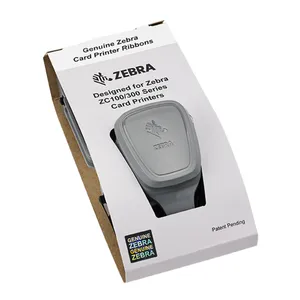
Zebra 800300-360 YMCKOK color ribbon. Compatible with Zebra ZC300 ID card printer. 200 prints.
| Additional Info |
|
|---|---|
| Printer Compatibility | ZC300 |
| Ribbon Type | YMCKOK |
| Ribbon Yield | 200 |
Frequently Asked Questions
What printer models is the Zebra 800300-360 ribbon compatible with?
The Zebra 800300-360 YMCKOK ribbon is designed for Zebra ZC300 card printers. We recommend verifying your printer model before ordering to ensure compatibility, as Zebra ribbons are model-specific. Contact us today if you need help identifying the right ribbon for your printer.
How many cards can I print with the Zebra 800300-360 ribbon?
This ribbon yields 200 prints per cartridge. The actual number of cards you can produce depends on your printer settings and the coverage of your designs, but 200 prints is the standard yield for this YMCKOK ribbon configuration.
What does YMCKOK mean and how does it work for dual-sided printing?
YMCKOK stands for Yellow, Magenta, Cyan, Black, Overlay, and Black—each panel serves a specific printing function. For dual-sided printing, the YMC panels, first K panel, and O protective overlay print on the front of the card, while the second K panel prints on the back side, enabling full-color dual-sided ID cards in a single pass.
Why should I use genuine Zebra ribbons instead of third-party alternatives?
Zebra card printers require specialized Zebra ribbons to function properly and maintain print quality. Using genuine Zebra ribbons maximizes printed card quality and protects your printer's durability and longevity. We offer only authentic Zebra supplies with a low price guarantee at idwholesaler.com.
What is the O panel in the YMCKOK ribbon?
The O panel is a thin, clear protective overlay that applies a protective coating to your printed cards. This overlay helps protect the printed image from wear, fading, and damage, extending the life of your ID badges and credentials.
Does the Zebra 800300-360 ribbon include a cleaning roller?
Yes, this ribbon includes a cleaning roller to help maintain your printer's performance and print quality over time. Regular use of the cleaning roller helps prevent debris buildup and ensures consistent, high-quality card printing throughout the ribbon's 200-print lifespan.